Plugin documentation
Add Product AI
Add Product AI is a private/pro WordPress plugin that adds an AI-assisted Product Studio for WooCommerce admins and WCFM vendors. It helps create simple or variable products from product images, seller notes, manual review fields, and optional image improvement workflows.
WooCommerce simple products, variable products, categories, tags, brands, SEO metadata, attributes, variations, featured images, and galleries.
WordPress admin under Products > Add Product AI and, when available, WCFM Dashboard > Add Product AI.
OpenAI powers product autofill. Gemini Nano Banana powers image improvement when configured, with OpenAI as fallback.
Quick start
Recommended setup sequence
- Install the plugin folder inside `wp-content/plugins/` and activate Add Product AI.
- Confirm WooCommerce is active. WCFM is optional.
- Open Product Studio > Activation and activate the site license.
- Open Product Studio > Settings and add the OpenAI API key and OpenAI model.
- Optionally add Gemini API key and select the Gemini image model for Nano Banana image improvement.
- Create product categories before first use. Add category-specific AI Prompt text where needed.
- Configure brand terms and SEO plugin settings before vendors start creating products.
- If WCFM is active, review WCFM modules, membership plans, capability groups, product limits, storage limits, and Product Studio token limits.
- Open Products > Add Product AI or WCFM Dashboard > Add Product AI and create the listing.
Requirements
Environment and dependency checklist
| Requirement | Status | Why it matters |
|---|---|---|
| WordPress 6.0+ | Required | Base CMS and admin/runtime APIs. |
| PHP 7.4+ | Required | Plugin runtime requirement. |
| WooCommerce | Required | Product creation, product categories, product tags, media, prices, attributes, and variations. |
| Active license | Required in pro build | Product Studio does not boot until the stored license status is active. |
| OpenAI API key | Required for AI autofill | Generates product copy and structured product suggestions from images and notes. |
| Gemini API key | Optional | Enables Nano Banana image improvement and gallery generation. |
| WCFM | Optional | Adds vendor dashboard access, membership checks, capability controls, product limits, and space limits. |
| SEO plugin | Optional | Enables SEO title, description, and focus keyword fields for supported SEO integrations. |
| Brand taxonomy | Optional | Enables brand selection and optional new-brand creation. |
License
Activation, verification, and status checks
This source tree is configured as the pro build. The plugin registers Product Studio > Activation for administrator users with `manage_options`. The main Product Studio workflow only loads when the license service reports `active`.
What the license page shows
- License key input.
- Current status and status message.
- Current site URL.
- Last check timestamp.
- Expiration value when returned by the licensing service.
- Activate, Check, and Deactivate actions.
How enforcement works
- License data is stored in the `apv_license` option.
- Activation validates the site license before Product Studio is unlocked.
- A scheduled `apv_license_check_event` refreshes license status.
- Manual license checks can refresh the displayed license state.
- Temporary connectivity failures can preserve an already active state during checks.
Settings
Product Studio settings reference
Settings are stored in the `apv_settings` option. Only administrator users can manage them.
| Setting | Default | Allowed range | Behavior |
|---|---|---|---|
| OpenAI API Key | Empty | Text | Required for Generate Product with AI and OpenAI fallback image editing. |
| OpenAI Model | `gpt-4.1-nano` | Model ID text | Used for structured product autofill through the OpenAI Responses API. |
| Gemini API Key | Empty | Text | Optional key for Nano Banana image improvement and generated gallery angles. |
| Gemini Image Model | `gemini-2.5-flash-image` | Preset or custom model ID | Used for Gemini image edit and gallery generation requests. |
| Image AI Temperature | `1.0` | 0.0 to 2.0 | Lower is more consistent; higher is more varied for image AI. |
| Fast Mode | Off | On/off | Uses smaller image preprocessing and fewer retries for faster Nano Banana processing. |
| Max Images Per Request | 2 | 0 to 50 | Limits selected images analyzed by AI autofill. `0` means use the fallback/default image limit, not zero images. |
| Max Categories From AI | 3 | 1 to 5 | Limits how many product category IDs AI can return. |
| Monthly Autofill Tokens | 0 | 0 to 50000 | Global monthly limit. One analyzed image uses one autofill token. `0` means unlimited. |
| Monthly Image Tokens | 0 | 0 to 50000 | Global monthly image AI limit. Each image operation uses one token. `0` means unlimited. |
| Extra Prompt Instructions | Empty | Textarea | Store-wide instructions inserted into every AI autofill request. |
Product workflow
The four Product Studio steps
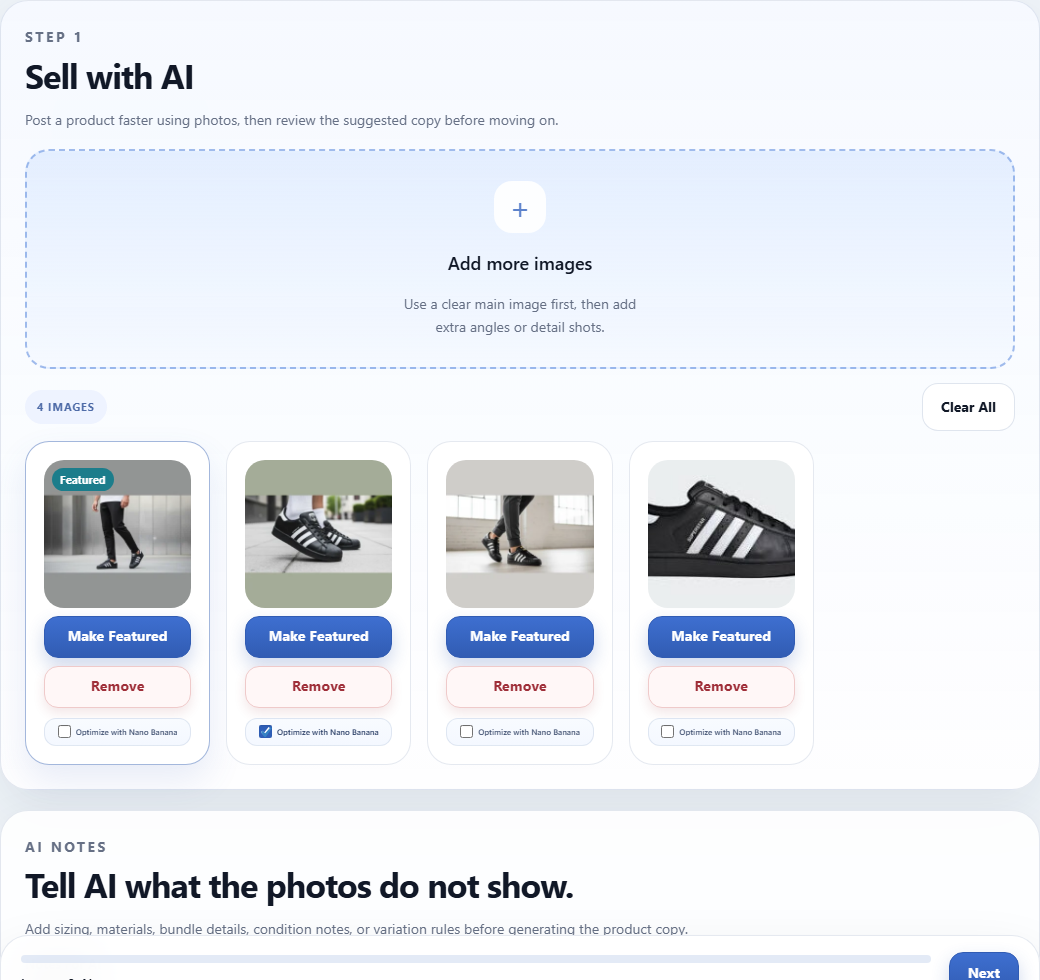
Images and AI
Users select product images from the media library, choose the featured image, mark images for Nano Banana optimization, and enter Notes For AI. Notes should cover hidden details such as size, material, color, condition, bundle contents, or variation rules.
Basics and Categories
Users review product type, title, short description, full description, SEO fields, tags, brand, prices, and selected categories. Category selection uses a searchable enhanced picker with a native multi-select fallback.
Attributes and Variations
Users define attributes, choose whether each attribute is visible, and mark purchase-option attributes for variations. Variable products can generate combinations and then review each variation image, SKU, regular price, sale price, and enabled state.
Review and Publish
Users review the listing summary and choose Create Product, Submit for Review, or Save Draft. The actual saved status depends on the submit action and the current user’s product publishing permissions.
Creation rules
How saved WooCommerce products are built
Product data
- Blank titles fall back to `Untitled Product`.
- Simple product prices are validated as a regular/sale price pair.
- Submitted image IDs are checked against media attachment permissions.
- If no featured image is selected, the first valid gallery image becomes featured.
- Tags are normalized from comma or newline-separated input and limited to 12 names.
- Focus keywords are normalized from comma or newline-separated input and limited to 6 names in product submission.
Variable products
- Variable products need at least one variation-enabled attribute with more than one value.
- Generated combinations are capped by `apv_max_generated_variations`, default 50.
- Variation rows preserve submitted images where valid, otherwise fall back to featured or first image.
- Each variation can set SKU, regular price, sale price, image, attributes, and enabled state.
- Enabled variations are published; disabled variations are private.
AI autofill
OpenAI product generation behavior
Generate Product with AI sends selected, authorized media attachments plus user notes to the OpenAI Responses API. The request includes valid store categories, existing brands, supported SEO state, store-wide prompt instructions, and the selected product images.
| AI output | Validation and cleanup |
|---|---|
| Product type | Allowed values are `simple` and `variable`. Variable can be downgraded to simple if useful variation attributes are missing. |
| Title and descriptions | Required fields. Description text is normalized into safe HTML when needed. |
| Categories | Only valid product category IDs from the store are accepted. Invalid category responses fall back where possible. |
| Tags | Unique, sanitized, limited to 12 tags. |
| Brand | AI can only choose an existing brand term ID. New brand creation is manual through the Add New Brand field. |
| SEO fields | Generated only when a supported SEO plugin is detected. SEO descriptions are limited to 160 characters. |
| Attributes | Unique names, useful values, up to 8 attributes, up to 12 values per attribute. |
| Variation combinations | Only valid attribute/value pairs are accepted and capped at the maximum generated variation count. |
| Variation image rules | Maps valid selected image positions to matching variation values where the image clearly supports the mapping. |
Image AI
Nano Banana, OpenAI fallback, and gallery preparation
Image improvement
- Improve Background creates a new media attachment; it does not overwrite the original media file.
- Gemini Nano Banana is preferred when a Gemini key is configured.
- OpenAI image editing is used as fallback when Gemini is unavailable and OpenAI is configured.
- Fast Mode reduces preprocessing size and retry work.
- Image temperature controls creative variation for image requests.
Automatic gallery preparation
- New uploads can be improved automatically.
- The workflow can generate additional gallery angles when a Gemini key is available.
- Category AI Prompt text can influence styling for category-specific product images.
- Generated images are normalized to square 512px WebP output for lightweight storefront use.
- Duplicate generated image binaries are detected and discarded.
Categories
Category selection and category-specific AI prompts
- Product Studio reads all `product_cat` terms, builds full category paths, and sorts them for searchable selection.
- AI receives the valid category list and must choose category IDs from that list only.
- Admins can add an optional AI Prompt on WooCommerce product category add/edit screens.
- Category prompt text is stored as term meta key `apv_ai_prompt`.
- Category prompt text is used by image preparation workflows to guide product image styling while keeping preservation rules mandatory.
SEO
Supported SEO plugin behavior
When a supported SEO integration is active, Product Studio shows SEO fields and persists metadata to the correct post meta keys or plugin table where applicable.
| Integration | Fields handled | Notes |
|---|---|---|
| Rank Math | SEO title, description, focus keyword | AI enforces stronger title requirements, including keyword inclusion, a power/sentiment word, and a number where missing. |
| Yoast SEO | SEO title, description, focus keyword | Stored in Yoast post meta keys. |
| All in One SEO | SEO title, description, keywords | Supports both post meta keys and the AIOSEO posts table when available. |
| SEOPress | SEO title, description, focus keyword | Stored in SEOPress meta keys. |
| The SEO Framework | SEO title, description | No focus keyword field is shown. |
| Slim SEO | SEO title, description | Stored in the `slim_seo` array meta value. |
Brands
Brand taxonomy support
The plugin detects an existing product brand taxonomy. It checks preferred taxonomy names first, then falls back to any product taxonomy whose name or labels include “brand”.
product_brand
pwb-brand
yith_product_brand
berocket_brand
brand
- If a brand taxonomy exists, Product Studio shows a brand dropdown.
- AI can select only from existing brands when there is a clear match.
- Users can enter Add New Brand manually; the plugin creates or reuses that term during product save.
- If no brand taxonomy exists, brand fields are hidden and no brand is assigned.
WCFM
Vendor dashboard, modules, memberships, and limits
Where vendors access it
- Endpoint key: `wcfm-product-studio`.
- Endpoint slug: `product-studio`.
- Menu label: Add Product AI.
- Menu priority: 6.
- Visible only when the current user can open Product Studio and add products.
Controls WCFM can apply
- WCFM Settings > Modules can shut down Product Studio globally.
- Capability groups can disable Product Studio for assigned vendors.
- Capability groups can override monthly autofill and image token limits.
- WCFM Membership can require an active membership plan.
- WCFM product limits and storage limits are enforced before rendering and saving.
Permissions
Who can use each part
| Area | Permission rule |
|---|---|
| License page | Administrator user with `manage_options`. |
| Settings page | Administrator user with `manage_options`. |
| WooCommerce admin Product Studio | Default capability is `edit_products`, filterable by `apv_admin_product_studio_capability`. |
| WCFM Product Studio | Vendor must pass membership, global module, capability group, add-product, product-limit, and space-limit checks. |
| Published product status | Users with publish permission create published products. Others submit pending products for review. |
| Media access | Attachments must be valid media items the current user can use. This is filterable with `apv_user_can_use_attachment`. |
External services
What data can leave the WordPress site
The plugin uses external services only when the relevant feature is configured and triggered. Store owners provide their own API keys for AI services.
| Service | Used for | Data sent | When it runs |
|---|---|---|---|
| OpenAI Responses API | Product autofill and fallback image editing. | Selected product images, optional seller notes, category list, brand list, SEO integration state, and store prompt instructions. | When the user clicks Generate Product with AI or when OpenAI fallback image editing is used. |
| Google Gemini generateContent API | Nano Banana image improvement, gallery angle generation, and Gemini key testing. | Selected product images or reference images, image-improvement prompts, category prompt guidance, and a small test prompt for key validation. | When image improvement/gallery preparation runs or when an admin clicks Test Gemini Key. |
| Licensing service | Pro license activation, deactivation, and status checks. | License and site activation details required to verify the subscription. | During activation, deactivation, and scheduled or manual license checks. |
Localization
Text domain, Arabic support, and RTL layout
- The plugin text domain is `add-product`.
- WordPress loads plugin translations from `/languages` when available.
- The plugin includes a translation helper that resolves the active locale from request locale, user locale, resolved locale, and site locale.
- English locales normalize to `en_US`; Arabic locales normalize to `ar`.
- Product Studio sets `dir="rtl"` for Arabic and `dir="ltr"` otherwise.
- WCFM menu label length is expanded for Arabic so labels are not truncated inside UTF-8 characters.
Developer notes
Files, hooks, options, and endpoints
Main files
- `add-product.php` registers constants and loads the plugin bootstrap.
- `includes/class-apv-plugin.php` handles boot, license page, license AJAX, dependency notices, and scheduled checks.
- `includes/class-apv-settings.php` registers settings and the built-in admin documentation page.
- `includes/class-apv-dashboard.php` registers Product Studio in WordPress admin and WCFM, loads assets, and handles submissions/AJAX.
- `includes/class-apv-product-service.php` validates and persists WooCommerce product data.
- `includes/class-apv-openai-service.php` handles OpenAI autofill, Gemini image workflows, image normalization, and token accounting.
- `templates/dashboard-product-studio.php` renders the Product Studio interface.
Important options and meta
- `apv_settings`: plugin AI and usage settings.
- `apv_license`: stored license status and last check data.
- `apv_flush_rewrite_rules`: temporary activation flag for endpoint rewrite flushing.
- `apv_ai_prompt`: product category term meta for category-specific AI instructions.
- `apv_autofill_tokens_YYYY_MM`: monthly user meta bucket for autofill usage.
- `apv_image_tokens_YYYY_MM`: monthly user meta bucket for image usage.
Useful filters
apv_admin_product_studio_capability
apv_max_generated_variations
apv_openai_autofill_model
apv_openai_image_edit_model
apv_gemini_image_edit_model
apv_autofill_default_image_limit
apv_autofill_image_max_dimension
apv_autofill_image_quality
apv_user_can_use_attachment
apv_delete_optimized_source_image
apv_vendor_roles
apv_seo_integration
Troubleshooting
Common issues and what to check
Confirm WooCommerce is active, the pro license status is active, and the current user has the required product capability. For WCFM vendors, also check membership, WCFM Settings > Modules, capability group settings, product limits, and storage limits.
Add an OpenAI API key in Product Studio > Settings. The manual product form can still be used after licensing even when OpenAI is not configured.
Create WooCommerce product categories before first use. AI category selection requires a valid store category list.
Add a Gemini API key for Nano Banana image improvement or configure OpenAI for the fallback image editor. Also check monthly image token limits.
Review WCFM publish-product permissions. Users without publish permission submit products for review instead of publishing immediately.
Reduce variation-enabled attribute values so combinations stay under the configured maximum. The default cap is 50 generated combinations.
Check that the license key is valid for this site, the activation limit has not been reached, and the WordPress site can make outbound HTTPS requests.